 Video coming soon
Place the phone firmly on the machine
Basics · Written steps
Read the steps : Place the phone firmly on the machineSteps, videos and tips for the tool.
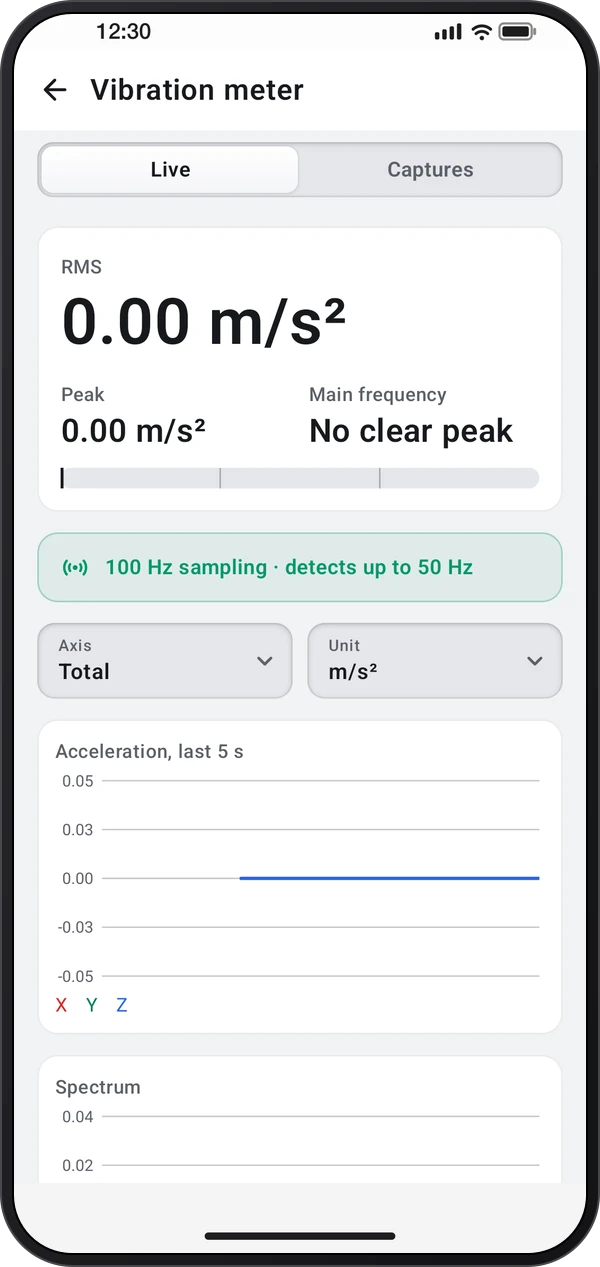
Measure vibration with the accelerometer: RMS, peak and main frequency, with a live spectrum and timed captures you can save and share.
Video coming soon
Getting started
Set the phone flat and firmly on the machine, or press it down, and open the vibration meter. It removes gravity and reads within a second.
This is a still image. The how-to video has not been recorded yet.
Read the stepsVideo coming soonBasics · Written steps
Read the steps : Place the phone firmly on the machineVideo coming soonBasics · Written steps
Read the steps : Inspect the trace and frequency spectrumVideo coming soonBasics · Written steps
Read the steps : Capture, save and export vibrationSet the phone flat and firmly on the machine, or press it down, and open the vibration meter. It removes gravity and reads within a second.
Pick the total or one axis. The trace shows the last five seconds, and the spectrum shows which frequencies stand out.
Start a capture of 5 to 60 seconds for steadier results, then save it. The Captures page lists them and shares them as CSV.
Try these steps in the app. All tour instructions stay readable here.
Set the phone flat and firmly on the machine, or press it down, and open the vibration meter. It removes gravity and reads within a second.
Pick the total or one axis. The trace shows the last five seconds, and the spectrum shows which frequencies stand out.
Start a capture of 5 to 60 seconds for steadier results, then save it. The Captures page lists them and shares them as CSV.
Find Vibration meter in these apps.
The sampling chip shows how fast this phone's accelerometer reads: it only detects vibrations up to half that rate.