 Video coming soon
Choose units and enter a value
Basics · Written steps
Read the steps : Choose units and enter a valueSteps, videos and tips for the tool.
Length · Area · Volume · Slope · Pressure · and more
Video coming soon
Getting started
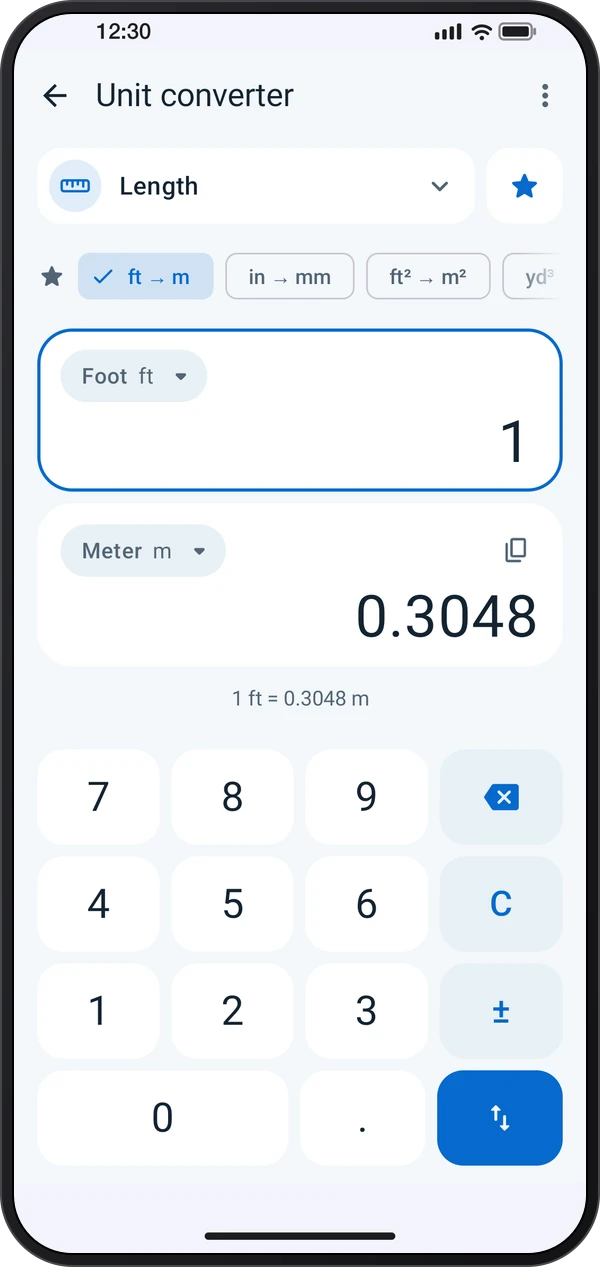
Tap the category to pick one, then tap a unit to change it. Type the value on the keypad: the answer updates as you type, and the swap key turns the pair around.
This is a still image. The how-to video has not been recorded yet.
Read the stepsVideo coming soonBasics · Written steps
Read the steps : Choose units and enter a valueVideo coming soonBasics · Written steps
Read the steps : Enter fractions or take the phone’s angleVideo coming soonBasics · Written steps
Read the steps : Choose a conversion layoutTap the category to pick one, then tap a unit to change it. Type the value on the keypad: the answer updates as you type, and the swap key turns the pair around.
Pick a screen in ⋮ › Screen layout: Pair and keypad, Every unit (one value in every unit of the category) or Conversion list (type “120 sq ft to m²” and keep a list to share).
In feet and inches, type 5 ′ 7 ″ 3 / 8 for 5′ 7 3/8″; answers round to the inch fraction set in Display. Slope and Angle can take the tilt from the phone: tap Measure and lay the phone on the surface.
Try these steps in the app. All tour instructions stay readable here.
Tap the category to pick one, then tap a unit to change it. Type the value on the keypad: the answer updates as you type, and the swap key turns the pair around.
In feet and inches, type 5 ′ 7 ″ 3 / 8 for 5′ 7 3/8″; answers round to the inch fraction set in Display. Slope and Angle can take the tilt from the phone: tap Measure and lay the phone on the surface.
Pick a screen in ⋮ › Screen layout: Pair and keypad, Every unit (one value in every unit of the category) or Conversion list (type “120 sq ft to m²” and keep a list to share).
Find Unit converter in these apps.
Pin the pairs and units you use most: pinned pairs sit above the cards, pinned units at the top of each list.