 Video coming soon
Choose a screen layout
Basics · Written steps
Read the steps : Choose a screen layoutSteps, videos and tips for the tool.
Read a snow slope's angle, the way it faces and your elevation over the avalanche angle bands. A guide only, not a safety device.
Video coming soon
Getting started
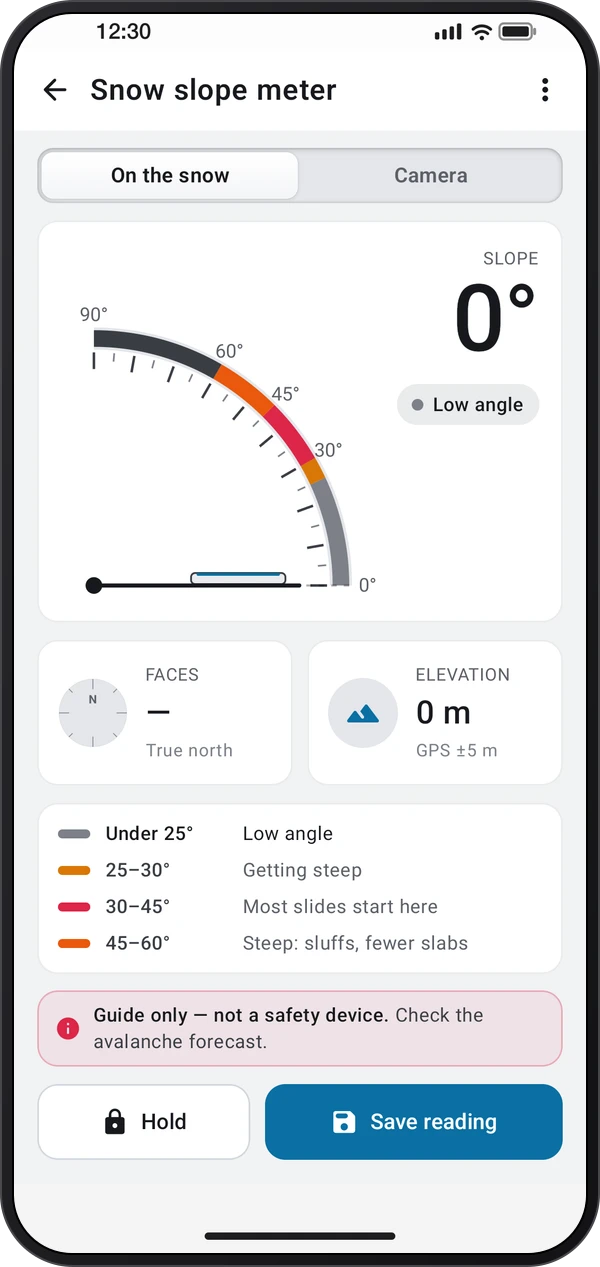
Pick a layout in ⋮ › Screen layout: Gauge, a dial with a Camera tab; Sight, one camera screen that reads the slope under you when you lay the phone down; or Field card, with a forecast rose and the Log.
This is a still image. The how-to video has not been recorded yet.
Read the stepsVideo coming soonBasics · Written steps
Read the steps : Choose a screen layoutVideo coming soonBasics · Written steps
Read the steps : Read the slope under the phoneVideo coming soonBasics · Written steps
Read the steps : Sight a slope through the cameraVideo coming soonBasics · Written steps
Read the steps : Hold, hear and save the angleVideo coming soonBasics · Written steps
Read the steps : Use the forecast rose and reading logPick a layout in ⋮ › Screen layout: Gauge, a dial with a Camera tab; Sight, one camera screen that reads the slope under you when you lay the phone down; or Field card, with a forecast rose and the Log.
On the snow: lay the phone flat on the slope, screen up, or on a ski pole laid straight down it. Allow location so the way the slope faces uses true north and your elevation shows.
Tap the reading or press a volume key to hold it, then tap Save reading to keep it. ⋮ › Speak the angle says the reading once it settles; turn off ⋮ › Volume keys hold to use the keys for the volume again.
In Field card, tap the aspects and heights today's avalanche forecast names on the forecast rose; this slope's part is outlined. ⋮ › Saved readings, or the Log tab, lists your readings to share as CSV.
With the camera, choose Sight. From the side: stand beside the slope and drag the red line onto its edge. Up or down the slope: aim at a point at your eye height, like a partner's head.
Try these steps in the app. All tour instructions stay readable here.
Pick a layout in ⋮ › Screen layout: Gauge, a dial with a Camera tab; Sight, one camera screen that reads the slope under you when you lay the phone down; or Field card, with a forecast rose and the Log.
On the snow: lay the phone flat on the slope, screen up, or on a ski pole laid straight down it. Allow location so the way the slope faces uses true north and your elevation shows.
With the camera, choose Sight. From the side: stand beside the slope and drag the red line onto its edge. Up or down the slope: aim at a point at your eye height, like a partner's head.
Tap the reading or press a volume key to hold it, then tap Save reading to keep it. ⋮ › Speak the angle says the reading once it settles; turn off ⋮ › Volume keys hold to use the keys for the volume again.
Find Snow slope meter in these apps.
The angle is only one sign of avalanche terrain among many. Read the avalanche forecast, get trained, and never rely on this app to say a slope is safe.