 Video coming soon
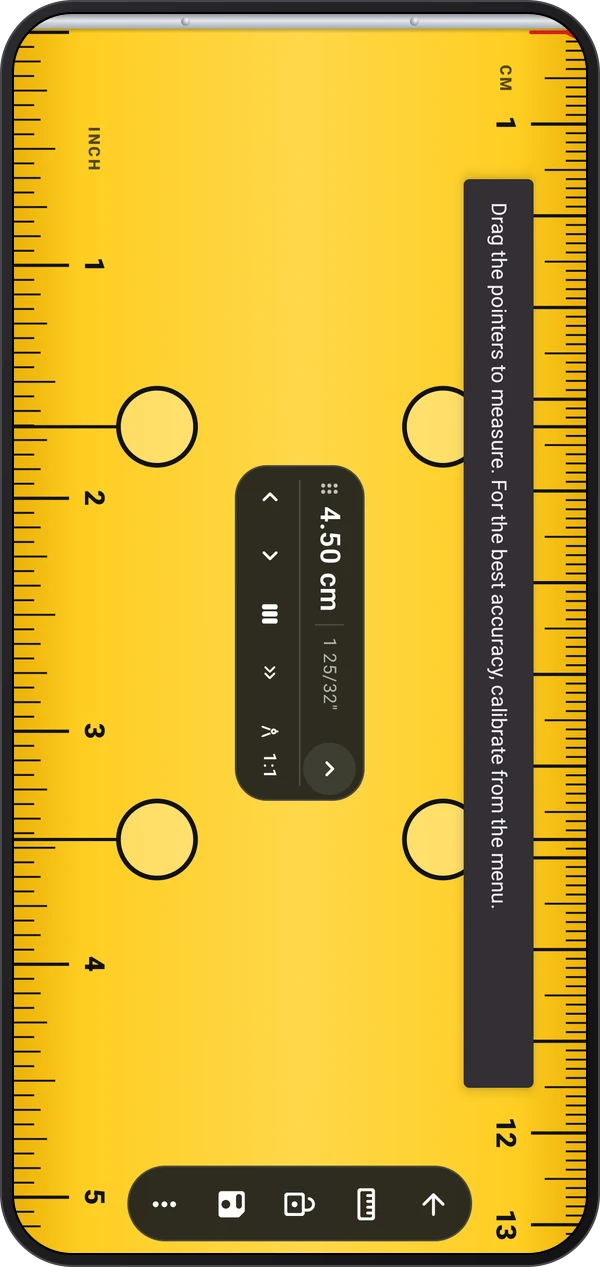
Fit the measuring guides to the object
Basics · Written steps
Read the steps : Fit the measuring guides to the objectSteps, videos and tips for the tool.
Measure length, area, diameters, thread pitches and wrench sizes on the screen, or show cards, coins and SIM cards at real size.
Video coming soon
Getting started
Tap Measure in the ruler's bar to pick a mode, lay the object on the screen and drag the pointers, circle or jaws to its edges. The magnifier and the nudge buttons help you place them exactly.
This is a still image. The how-to video has not been recorded yet.
Read the stepsVideo coming soonBasics · Written steps
Read the steps : Fit the measuring guides to the objectVideo coming soonBasics · Written steps
Read the steps : Lock the reading and measure beyond the screenVideo coming soonBasics · Written steps
Read the steps : Calibrate against a known sizeVideo coming soonBasics · Written steps
Read the steps : Save, copy or share the measurementVideo coming soonBasics · Written steps
Read the steps : Choose a ruler lookPick the ruler's look, such as Tape or Steel, from More options › Theme.
Lock the reading before you lift the object. Continue past the screen for longer objects, split a length into equal parts, or pick a drawing scale to read plans. Drag the reading out of the way, and tap the arrow beside the value to fold its tools away.
Save results to Records, or copy and share them.
Tap Measure in the ruler's bar to pick a mode, lay the object on the screen and drag the pointers, circle or jaws to its edges. The magnifier and the nudge buttons help you place them exactly.
Calibrate once from More options with a bank card, a coin or a real ruler.
Try these steps in the app. All tour instructions stay readable here.
Tap Measure in the ruler's bar to pick a mode, lay the object on the screen and drag the pointers, circle or jaws to its edges. The magnifier and the nudge buttons help you place them exactly.
Lock the reading before you lift the object. Continue past the screen for longer objects, split a length into equal parts, or pick a drawing scale to read plans. Drag the reading out of the way, and tap the arrow beside the value to fold its tools away.
Calibrate once from More options with a bank card, a coin or a real ruler. Save results to Records, or copy and share them. Pick the ruler's look, such as Tape or Steel, from More options › Theme.
Find Ruler in these apps.
On-screen measurements are only as accurate as the calibration. Check it now and then against a known reference, such as a bank card, and calibrate again if it is off.