 Video coming soon
Reach a target slope
Basics · Written steps
Read the steps : Reach a target slopeSteps, videos and tips for the tool.
Reach a target slope or level a surface, with how much to raise each end or corner.
Video coming soon
Getting started
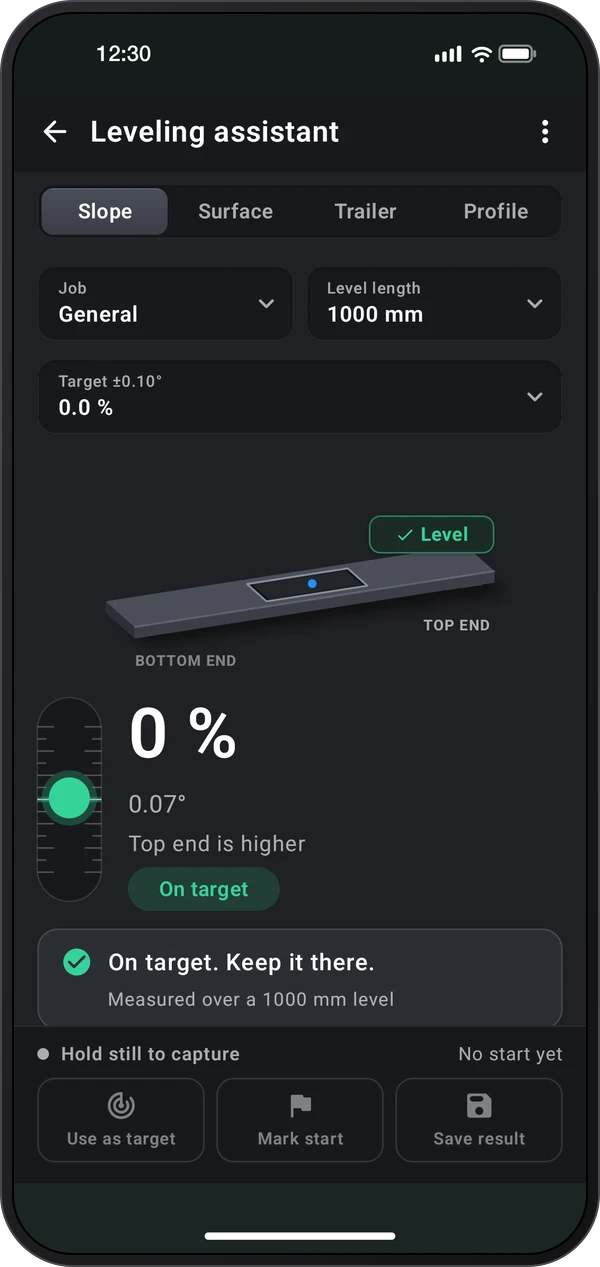
Slope: set a target such as level, a drainage fall, a 1:12 ramp, or a pipe fall per foot. Lay the phone flat along the slope, or on a level, and raise the end the screen shows until it reads On target.
This is a still image. The how-to video has not been recorded yet.
Read the stepsVideo coming soonBasics · Written steps
Read the steps : Reach a target slopeVideo coming soonBasics · Written steps
Read the steps : Level a surface or trailerVideo coming soonBasics · Written steps
Read the steps : Correct for the phone’s mountingVideo coming soonBasics · Written steps
Read the steps : Recheck and save the adjustmentVideo coming soonBasics · Written steps
Read the steps : Measure a surface profileSlope: set a target such as level, a drainage fall, a 1:12 ramp, or a pipe fall per foot. Lay the phone flat along the slope, or on a level, and raise the end the screen shows until it reads On target.
Profile: fix the phone to a straightedge, set the contact-point spacing, and add a stable reading at each marked span. The chart estimates relative humps and dips; share the CSV. Error can accumulate.
Surface and Trailer: use Surface for tables and appliances on four feet, or Trailer for caravans and trailers on two wheels and a hitch. Enter the size, lay the phone flat with its top edge toward the front, and raise each foot, wheel or the hitch by the amount on the drawing. ⋮ › Screen layout switches between the 3D view and the side views.
Choose Calibrate in the ⋮ menu if a case or camera bump tilts the phone: take one reading, turn the phone around on the same spot, and take another.
Pick what you are leveling in the Job field. With the buttons at the bottom, mark a steady start, adjust, and Recheck, then save the before/after result. On Surface, Match surface takes the current reading as the target, or turn on Target lock. Check accuracy is in the ⋮ menu.
Try these steps in the app. All tour instructions stay readable here.
Slope: set a target such as level, a drainage fall, a 1:12 ramp, or a pipe fall per foot. Lay the phone flat along the slope, or on a level, and raise the end the screen shows until it reads On target.
Surface and Trailer: use Surface for tables and appliances on four feet, or Trailer for caravans and trailers on two wheels and a hitch. Enter the size, lay the phone flat with its top edge toward the front, and raise each foot, wheel or the hitch by the amount on the drawing. ⋮ › Screen layout switches between the 3D view and the side views.
Choose Calibrate in the ⋮ menu if a case or camera bump tilts the phone: take one reading, turn the phone around on the same spot, and take another.
Pick what you are leveling in the Job field. With the buttons at the bottom, mark a steady start, adjust, and Recheck, then save the before/after result. On Surface, Match surface takes the current reading as the target, or turn on Target lock. Check accuracy is in the ⋮ menu.
Find Leveling assistant in these apps.
Set a target slope to turn on Target lock: the reading stops once the slope holds within the tolerance, with a beep, a vibration or the spoken value if you like.