 Video coming soon
Read headings on the bezel or globe
Basics · Written steps
Read the steps : Read headings on the bezel or globeSteps, videos and tips for the tool.
Read magnetic and true headings on a bezel dial or on a globe that turns with the phone.
Video coming soon
Getting started
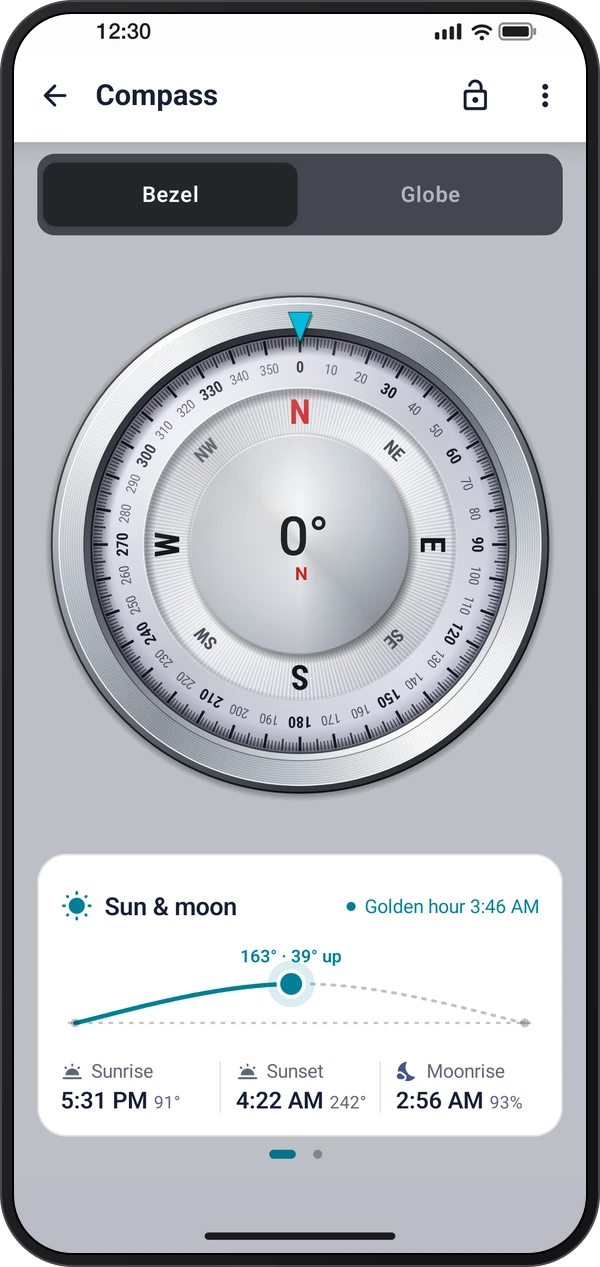
Read the magnetic heading, the true heading and the magnetic field at the top. The Bezel and Globe tabs switch between the dial and a globe that turns with the phone; pinch the globe to resize it. Use Lock to hold the compass display.
This is a still image. The how-to video has not been recorded yet.
Read the stepsVideo coming soonBasics · Written steps
Read the steps : Read headings on the bezel or globeVideo coming soonBasics · Written steps
Read the steps : Choose a bezel, globe or themeVideo coming soonBasics · Written steps
Read the steps : Enable true north and location views⋮ › Bezel, or ⋮ › Globe on the Globe tab, picks its look. ⋮ › Theme dresses the screen: System follows Settings › General Settings › Theme, Light and Dark keep one look, and Bezel takes the bezel's own colors.
Read the magnetic heading, the true heading and the magnetic field at the top. The Bezel and Globe tabs switch between the dial and a globe that turns with the phone; pinch the globe to resize it. Use Lock to hold the compass display.
Allow location and turn on device location for the true heading and for the bezels that show the sun, the stars or your walk. Check magnetic interference if the heading becomes unstable.
Try these steps in the app. All tour instructions stay readable here.
Read the magnetic heading, the true heading and the magnetic field at the top. The Bezel and Globe tabs switch between the dial and a globe that turns with the phone; pinch the globe to resize it. Use Lock to hold the compass display.
⋮ › Bezel, or ⋮ › Globe on the Globe tab, picks its look. ⋮ › Theme dresses the screen: System follows Settings › General Settings › Theme, Light and Dark keep one look, and Bezel takes the bezel's own colors.
Allow location and turn on device location for the true heading and for the bezels that show the sun, the stars or your walk. Check magnetic interference if the heading becomes unstable.
Find Compass in these apps.
Move away from magnets and metal, then follow ⋮ › Calibration help for the figure-eight calibration. The true heading depends on a usable location fix.