 Video coming soon
Use the scientific calculator
Basics · Written steps
Read the steps : Use the scientific calculatorSteps, videos and tips for the tool.
A scientific calculator that works in degrees, a fractions calculator, and calculators for triangles, frames, workshop jobs, everyday math, survey, road and camera.
Video coming soon
Getting started
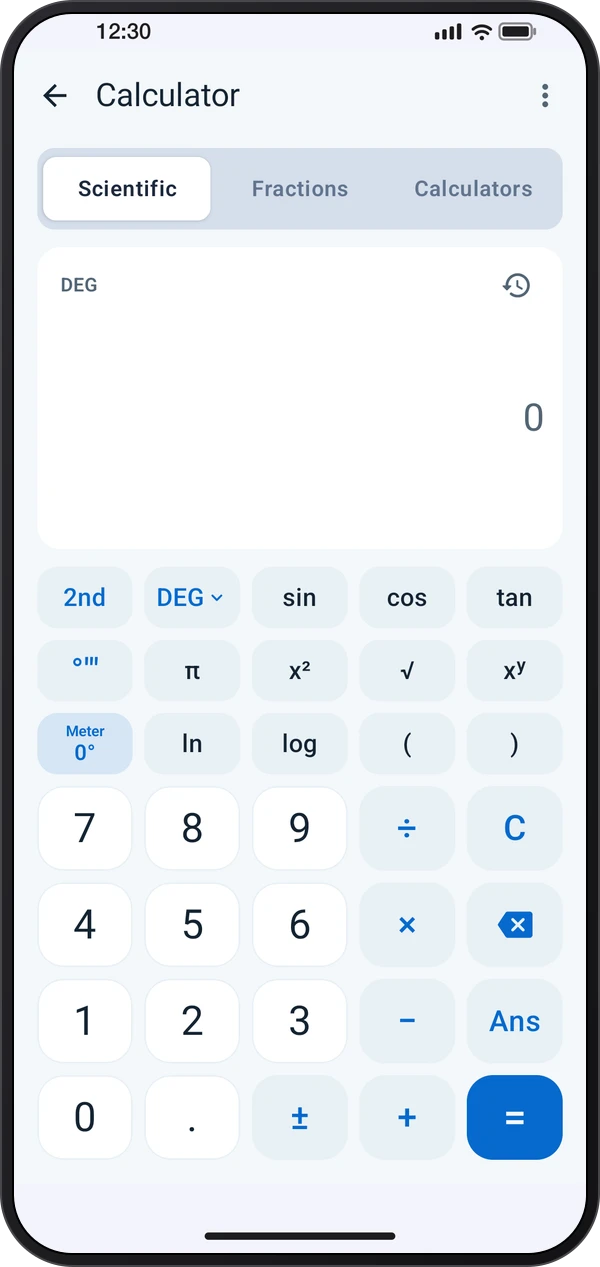
Scientific works in degrees unless you pick RAD or GRAD on the DEG key. Type degrees, minutes and seconds with the °′″ key, and tap Meter to put the phone's angle into the sum. 2nd swaps the keys for their inverse and more, and the clock shows the history.
This is a still image. The how-to video has not been recorded yet.
Read the stepsVideo coming soonBasics · Written steps
Read the steps : Use the scientific calculatorVideo coming soonBasics · Written steps
Read the steps : Calculate with mixed fractionsVideo coming soonBasics · Written steps
Read the steps : Solve a geometry or workshop problemScientific works in degrees unless you pick RAD or GRAD on the DEG key. Type degrees, minutes and seconds with the °′″ key, and tap Meter to put the phone's angle into the sum. 2nd swaps the keys for their inverse and more, and the clock shows the history.
In Fractions, tap a b/c to start a mixed number and the fraction key to type the bottom number. Answers are always simplified and shown as a decimal too, and Steps shows how the sum was worked out.
In Calculators, pick one by its drawing. Tap a value on the drawing or in the list to type it: outlined values are yours, filled ones are worked out. An angle can take the meter's reading from the keypad, or tap Measure and lay the phone on the part.
Try these steps in the app. All tour instructions stay readable here.
Scientific works in degrees unless you pick RAD or GRAD on the DEG key. Type degrees, minutes and seconds with the °′″ key, and tap Meter to put the phone's angle into the sum. 2nd swaps the keys for their inverse and more, and the clock shows the history.
In Fractions, tap a b/c to start a mixed number and the fraction key to type the bottom number. Answers are always simplified and shown as a decimal too, and Steps shows how the sum was worked out.
In Calculators, pick one by its drawing. Tap a value on the drawing or in the list to type it: outlined values are yours, filled ones are worked out. An angle can take the meter's reading from the keypad, or tap Measure and lay the phone on the part.
Find Calculator in these apps.
Your values stay when you leave a calculator, and ⋮ › Clear values starts it again. Workshop speeds and table values are starting points: check them against your tools and materials.