 Video coming soon
Choose Edge, Back or Level
Basics · Written steps
Read the steps : Choose Edge, Back or LevelSteps, videos and tips for the tool.
Read the angle of an edge, the slope of a surface, or level in two directions, then hold, save or record the reading.
Video coming soon
Getting started
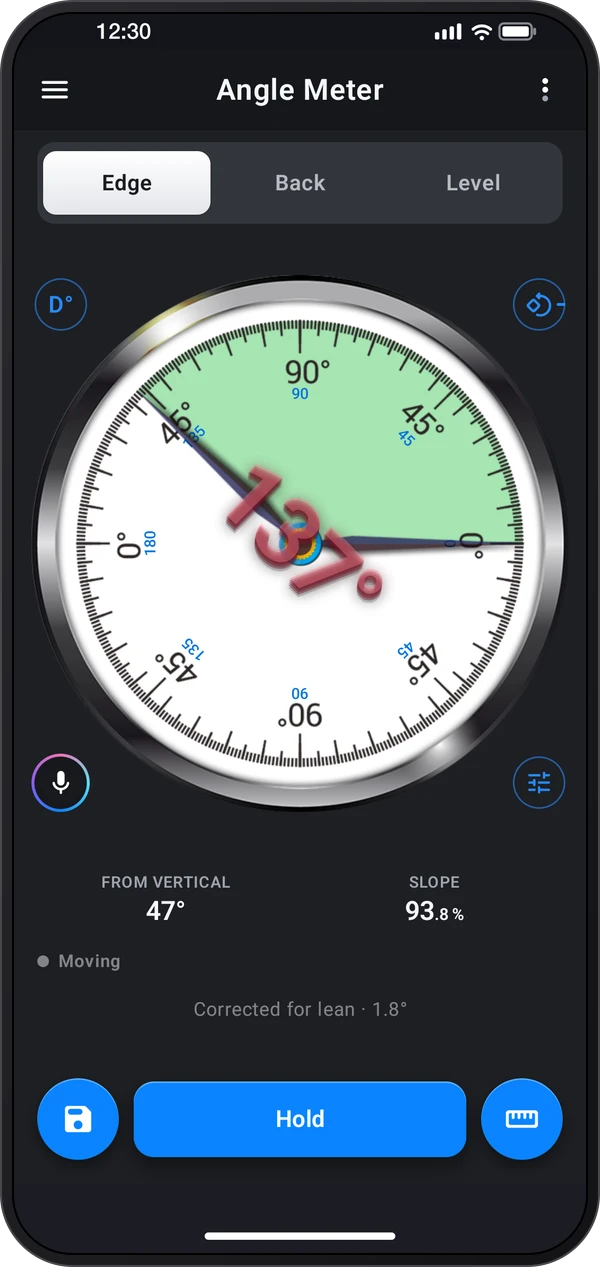
Pick a tab: Edge reads the angle of an edge the phone stands on, Back the slope of the surface under it, and Level both directions on a flat surface.
This is a still image. The how-to video has not been recorded yet.
Read the stepsVideo coming soonBasics · Written steps
Read the steps : Choose Edge, Back or LevelVideo coming soonBasics · Written steps
Read the steps : Hold and resume a readingVideo coming soonBasics · Written steps
Read the steps : Save readings and choose a measurementVideo coming soonBasics · Written steps
Read the steps : Learn calibration and set a referenceVideo coming soonBasics · Written steps
Read the steps : Calibrate the side you usePick a tab: Edge reads the angle of an edge the phone stands on, Back the slope of the surface under it, and Level both directions on a flat surface.
The Save menu keeps the reading in Records. The Measurement menu has relative angles, targets, references and interval measurement.
Hold the phone still and read the dial. Tap Hold to keep the reading, and Measure again to go on.
Open ⋮ › Tour & lessons › Tour for the calibration demonstration. To set your own reference, place the phone on a known level surface, keep it still, then open Calibrate and tap Calibrate to set it to 0°. The demonstration does not change your saved calibration.
Edge keeps a separate calibration for each zero mark: Right, Top, Left and Bottom. Choose the zero mark for the side you are using before calibrating. Calibrate and Reset affect only that zero mark. Back and Level share their calibration.
Try these steps in the app. All tour instructions stay readable here.
Use a known level surface to set the reference for the phone’s sensors. Place the phone on a known level surface, keep it still, then open Calibrate and tap Calibrate to set it to 0°. Each zero mark on Edge keeps its own calibration.
Rest the phone’s long side on the edge. The needle points at the angle, and the number stays upright however you turn the phone.
Put the phone on its back, top edge uphill. Back reads the slope of whatever it lies on: panels, lids, ramps and roofs.
Level shows both directions at once: the bubble drifts to the high side and sits in the middle when the surface is level.
Pick Difference between two angles in the Measurement menu. Set angle 1 on the first part, then put the phone on the second: the meter gives the angle between them.
Tap Save: Quick save keeps the reading in Records at once, and Save with details lets you name it and add a note first.
Find Angle Meter in these apps.
Match the tab to the phone’s position: Stand the phone on its long side for Edge. Lay it on its back for a surface slope, or use Level to see both directions together.
Calibrate the side you are using: On Edge, choose the Right, Top, Left or Bottom zero mark before calibrating on a known level reference. Each side keeps its own calibration.
Compare two parts: Choose Difference, set angle 1 on the first part, then move to the second. Use Relative angle instead when you want the first part to read zero.
Wait for a steady reading: Let the phone settle, then tap the dial to Hold. You can lift the phone away to read the result without changing it.
Read the unit the job uses: Open the unit control for degrees, percent, a ratio, pitch or mm/m. Fall over a span can turn the slope into a rise or drop over a length you enter.
Save useful context: Use Save with details to add a title and note. Open the saved message to return to the record later.